
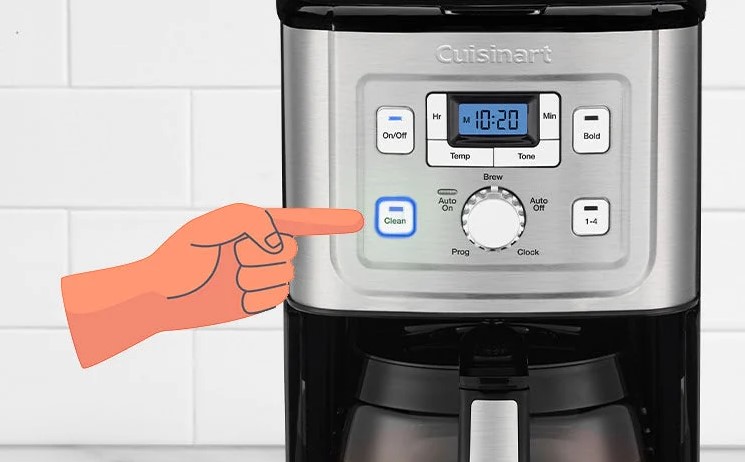
If your Cuisinart coffee maker clean button not working, don’t panic; it is often caused by a simple sensor glitch or a need for a manual reset. By following these proven troubleshooting steps, you can quickly clear the indicator light and get your morning coffee routine back on track.
There is nothing quite as frustrating as waking up, craving that first hot cup of java, and seeing your Cuisinart coffee maker flashing a stubborn “Clean” light at you. You have already scrubbed the carafe, wiped down the hot plate, and maybe even run a cycle, but the button simply refuses to respond.
You are searching for why your Cuisinart coffee maker clean button not working, and you just want it to go away so you can get back to your caffeine ritual. Many of us have been there. In 2026, Cuisinart machines are more high-tech than ever, but that internal computer logic can sometimes be a bit fussy.
Whether you have the latest Grind & Brew or a classic programmable model, the clean indicator is designed to protect your machine from scale buildup. When it glitches, it can feel like your kitchen is held hostage by a blinking light. Let’s walk through how to fix this together in plain, simple terms.
Key Takeaways
- Sensor Sensitivity: The clean light is a timer-based system that sometimes gets stuck due to power surges or mineral buildup on the sensor.
- Manual Reset: Unplugging your machine for at least 30 minutes is the most effective way to clear the internal memory of the control board.
- Vinegar Cycles: If the clean light stays on, it is usually because the machine hasn’t “detected” a full cleaning cycle yet; ensure you use a vinegar-water mix.
- Button Damage: Mechanical failure of the button itself is rare but possible; check for debris or sticky residue under the rubber seal.
- Hard Water Impact: Excessive calcium deposits can block the sensors inside the internal tubing, preventing the “clean” process from completing.
Understanding the Clean Indicator Logic
Before we dive into the repairs, it helps to understand why your machine is acting this way. The “Clean” feature on your Cuisinart is essentially a programmed timer. Depending on the model, it triggers a light after about 60 to 100 brew cycles. It doesn’t actually “know” if your machine is dirty; it just knows how many times you have pressed “Brew.”
The Timer vs. The Sensor
Sometimes, the machine keeps the light on because it expects a specific sequence of events. If you ran a cleaning cycle but did it too quickly, or if the water reservoir wasn’t filled to the max line, the internal logic might not have registered that the “clean” process finished. This is the most common reason for a Cuisinart coffee maker clean button not working correctly. The computer is essentially saying, “I am still waiting for that cycle to finish.”
When Power Issues Interfere
Modern kitchens are full of smart appliances, and sometimes a minor power surge can scramble the digital settings of your coffee maker. If your electricity flickered or if the machine was unplugged while mid-cycle, the processor might be stuck in a loop. Think of it like a computer that needs a reboot. Giving it a fresh start is often the simplest and most successful fix.
The Power Reset Technique
The first thing to try when your Cuisinart coffee maker clean button not working is a full power drain. This is the “have you tried turning it off and on again” solution, and it works surprisingly well for coffee machines. Most people unplug their machine for a few seconds, but that isn’t enough to drain the internal capacitor.

Visual guide about Cuisinart Coffee Maker Clean Button Not Working
Image source: cafenfood.com
Steps to Perform a Hard Reset
First, turn off the machine using the power button. Then, unplug it from the wall outlet. Leave it unplugged for at least 30 to 60 minutes. During this time, the internal memory will lose its “state,” effectively wiping the error code or the stuck indicator light. Once you plug it back in, the system should behave as if it just came out of the box.
Checking the Outlet
While the machine is unplugged, take a look at the wall outlet itself. Is it loose? Is it sharing power with a high-draw appliance like a toaster or an air fryer? Sometimes, insufficient power can cause the display panel to act glitchy. If you suspect an electrical issue, try moving the coffee maker to a different circuit to see if the button becomes responsive again.
Running a Proper Cleaning Cycle
If the reset didn’t work, the machine might still be “holding a grudge.” If your Cuisinart coffee maker clean button not working because the light refuses to turn off, you might need to force a successful cleaning cycle. The machine is programmed to look for a specific amount of time the water takes to pass through the heater.
The Vinegar and Water Solution
Mix a solution of one-third white vinegar and two-thirds water. Fill the reservoir to the maximum capacity line. Press the “Clean” button. It is vital that you let the entire cycle run until it finishes automatically. If you stop the machine prematurely, the light will continue to blink because the machine thinks the cleaning is incomplete. When the cycle ends, run two more full cycles with plain, fresh water to flush out the vinegar smell.
Why the Rinse Matters
The internal sensor measures the temperature of the water as it passes through the heating element. If the heating element is heavily scaled, the water flow is restricted, and the machine senses that the cycle isn’t “normal.” By using a vinegar mix, you break down those minerals, allowing the water to flow freely again. Often, once the machine detects a full, unobstructed cycle, the clean light will turn off automatically.
Cleaning the Button and Control Panel
Sometimes the issue isn’t electronic; it is physical. If your Cuisinart coffee maker clean button not working, it could be because the button is stuck or covered in grime. Over time, coffee oils, steam, and kitchen dust can build up around the edges of the control buttons. This creates a “sticky” seal that prevents the switch from making contact with the circuit board.
Cleaning the Surface
Use a damp not wet microfiber cloth with a tiny drop of dish soap to wipe down the control panel. Pay special attention to the gap around the “Clean” button. Use a dry, soft-bristled toothbrush to gently sweep away any debris trapped in the button housing. Be very careful not to let any liquid seep behind the panel, as this can cause a short circuit.
Tactile Feedback
When you press the button, does it feel “mushy” or unresponsive? If you feel a distinct “click,” the mechanical switch is likely fine. If it feels soft, there is definitely debris underneath. Keep gently tapping and cleaning the edges. Often, simply working the button a few times while cleaning it will free up the mechanism.
Dealing with Internal Mineral Buildup
If you live in an area with “hard” water, your coffee maker is working double-time. Hard water contains high amounts of calcium and magnesium. These minerals solidify into a crust inside the tubes of your machine. If your Cuisinart coffee maker clean button not working, it may be because a sensor inside is being blocked by a massive chunk of scale.
The Descaling Reality
You may need a stronger descaling solution if standard vinegar isn’t cutting it. Specialized coffee machine descalers are more potent than white vinegar. Follow the instructions on the bottle. If you have let the machine go for years without a clean, you might need to run two back-to-back descaling cycles to truly clear out the internal paths.
Checking for Air Pockets
Sometimes, an air pocket gets stuck in the water line during a clean cycle. If this happens, the water won’t pump correctly, and the “Clean” light will remain on. If you hear a loud gurgling noise but no water is coming out, try lifting the machine slightly or gently rocking it to dislodge the trapped air. This is a common trick that many repair technicians use to clear flow issues.
When to Consider Professional Help?
If you have tried the reset, performed a full cleaning cycle, and checked for physical debris, but the Cuisinart coffee maker clean button not working, you may be looking at a faulty control board. Coffee makers operate in a high-humidity environment. Over years, moisture can eventually cause corrosion on the internal wiring or the electronic board.
Warranty and Support
Check the bottom of your machine for the model number and contact Cuisinart customer support. If your machine is less than three years old, it might still be under a limited warranty. Do not try to open the main housing of the coffee maker unless you are an expert, as this will immediately void your warranty and poses a significant safety risk.
Is it Time for an Upgrade?
If the cost of a professional repair exceeds the cost of a new machine, it might be time to say goodbye. Coffee makers have a lifespan, typically around 5 to 7 years with good care. If your unit is older, consider this a sign that it is time to look for a newer model with better features. By keeping your next machine clean from day one, you can prevent these issues from happening again.
Maintaining your coffee maker is part of the joy of home brewing. By taking the time to understand the signals your machine is sending you, you become the master of your morning routine. A blinking light is not a catastrophe; it is just a reminder to give your machine a little TLC. Happy brewing!
Frequently Asked Questions
Why is my Cuisinart clean light blinking after I already cleaned it?
The machine likely did not detect a full cleaning cycle, or it needs a hard reset. Try unplugging the coffee maker for at least 30 minutes to clear the internal memory of the control board.
Can I use something other than vinegar to clean my machine?
Yes, you can use commercial descaling solutions specifically formulated for coffee makers, which are often more effective at removing tough mineral deposits. Always follow the manufacturer’s instructions on the packaging for the best results.
What should I do if the button feels stuck or “mushy”?
Use a soft-bristled toothbrush to gently clean the debris from around the edges of the button. The “mushy” feeling usually comes from sticky residue, so cleaning it carefully can often restore the button’s responsiveness.
Will unplugging my coffee maker erase my programmed auto-brew settings?
Yes, most Cuisinart models will lose their programmed time and auto-brew settings if left unplugged for an extended period. You will need to reset the clock and the timer once the machine is plugged back in.
How often should I really be using the clean function?
It is generally recommended to use the clean function every 60 to 90 brew cycles, or once a month if you have very hard water. This prevents mineral buildup and keeps your coffee tasting fresh.
Is it safe to open the coffee maker to fix the button myself?
We strongly advise against opening the main housing of the coffee maker, as it contains electrical components that pose a risk of shock. Doing so will also void your warranty, so stick to external cleaning and software resets.