
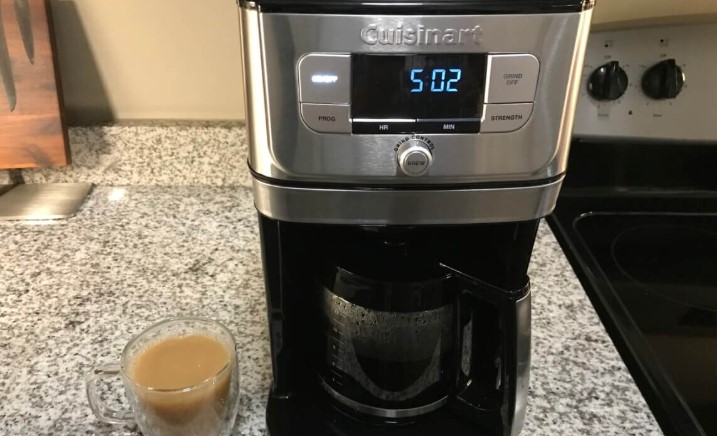
If your Cuisinart coffee maker brew light is not working, don’t assume the machine is broken. Often, this is a simple issue related to power connections, faulty bulbs, or a loose internal wiring harness that can be resolved with basic troubleshooting. Follow our expert guide to safely diagnose and fix your appliance so you can get back to brewing your morning cup.
There is nothing quite like the smell of fresh coffee filling your kitchen in the morning. You walk over to your trusted machine, fill the reservoir, add your favorite grounds, and press the button but nothing happens. Or worse, everything seems fine, but your Cuisinart coffee maker brew light not working leaves you wondering if the machine is actually heating. It is a frustrating scenario that many of us face at least once in the lifespan of our favorite appliances.
In 2026, Cuisinart remains a staple in kitchens everywhere, known for durability and sleek design. However, even the best machines encounter minor hiccups. When you notice that the indicator light has gone dark, it can be hard to tell if you are dealing with a simple burnt-out bulb or a more serious electrical failure. This guide will walk you through everything you need to know to get your morning routine back on track.
Key Takeaways
- Power Connection: Always check your wall outlet and power cord first to ensure the unit is receiving adequate electricity.
- Control Panel Issues: Sometimes the indicator light fails due to moisture buildup or debris behind the button interface.
- Internal Wiring: Older models may experience loose internal connections that require a simple reset or minor adjustment.
- Bulb Life: In some Cuisinart models, the brew light is a small LED that may burn out, though the machine will still brew normally.
- Resetting the Machine: A hard reset by unplugging the unit for ten minutes often clears electronic glitches in newer digital models.
- Safety First: Never attempt internal repairs while the machine is plugged into a power source to avoid electrical shock.
Understanding Why Your Brew Light Fails
Before diving into the mechanical repairs, it helps to understand why the Cuisinart coffee maker brew light not working is such a common complaint. In most cases, these lights are LED or small incandescent bulbs integrated into the control board. Because these machines operate in environments filled with steam and heat, the internal components are subjected to constant expansion and contraction.
Power and Connectivity Issues
The most frequent culprit is actually the simplest one: power. If the brew light is not illuminating, the machine might not be receiving enough power to engage both the heating element and the light circuit. Check your circuit breaker or the GFCI outlet. Sometimes, the issue is as simple as a cord that has been pulled slightly loose from the wall after cleaning your countertop.
The Role of Moisture and Debris
Coffee makers live in a humid environment. Steam naturally rises from the carafe area and can seep into the control panel. Over years of use, this moisture can cause minor corrosion on the contact points behind the brew button.
This does not always stop the machine from brewing, but it can stop the signal from reaching the indicator light. If you notice your buttons feel “sticky,” this is a telltale sign that debris or sugar residue has worked its way inside.
Step-by-Step Troubleshooting for the Brew Light
When you discover your Cuisinart coffee maker brew light not working, you do not need to call a professional right away. You can perform several diagnostic steps from the comfort of your kitchen. Start by unplugging the machine and performing a visual inspection of the cord and the plug.

Visual guide about Cuisinart Coffee Maker Brew Light Not Working
Image source: coffeegrindguru.com
Performing a Hard Reset
Modern Cuisinart machines contain internal microprocessors. Just like your smartphone or laptop, these machines can get stuck in a “digital loop.” To perform a hard reset, unplug the machine from the wall outlet completely.
Leave it disconnected for at least ten to fifteen minutes. During this time, press the brew button a few times while the machine is unplugged to drain any residual charge in the capacitors. Plug it back in and see if the light resets when you turn it on.
Checking the Water Reservoir and Filter
Many Cuisinart models feature safety sensors that prevent the brew cycle from starting if the reservoir is empty or the filter basket is improperly seated. If the safety sensor is triggered, the light may stay off as a warning. Ensure the reservoir is clicked firmly into place and the filter basket is closed. If the machine thinks it is not ready to brew, the light will remain dim to protect the internal components from overheating.
When to Consider Internal Repairs?
If you have tried the reset and checked your power, you might be looking at an internal issue. If your Cuisinart coffee maker brew light not working is accompanied by a failure to heat water, the problem is likely an internal fuse or a thermostat issue. This is where you need to be very careful.
Inspecting the Internal Wiring
If you are comfortable with basic tools, you can remove the outer housing of your Cuisinart. Always ensure the device is unplugged first. Inside, look for any burnt wires or loose connectors. Often, the vibration of the machine over years of use can shake a wire loose from the indicator light assembly. If you see a loose wire, a simple reconnection might solve the problem immediately.
Cleaning the Contact Pads
If the light is loose or flickering, the contact pads behind the buttons might be dirty. Using a small amount of high-percentage isopropyl alcohol on a cotton swab, you can gently wipe the contact points. This is usually effective for machines that have been in use for more than five years. Avoid using excessive water, as this can cause further damage to the sensitive electronics.
Understanding Model-Specific Quirks
Not all Cuisinart machines are built the same way. The coffee makers produced in 2026 have different interfaces compared to models from a decade ago. It is important to know which series you own. Some high-end machines feature digital screens that display error codes, while others use simple push-button lights.
Digital Display vs. Analog Indicators
If your machine has a digital screen, look for a blinking icon. The Cuisinart coffee maker brew light not working might actually be a symptom of a “Clean” cycle being overdue. When the machine signals that it needs to be descaled, the brew light might stay off to discourage use until the cleaning cycle is performed. Always check your manual to see if a blinking or solid light indicates a maintenance requirement rather than a malfunction.
The Importance of Descaling
Scale buildup is the enemy of any coffee maker. Minerals from your tap water accumulate inside the heating element, causing the water to take longer to heat. If the heating cycle takes too long, some newer models will automatically cut the power to the light to indicate a fault. Descaling your machine with a mixture of vinegar and water can often clear these hidden issues and get your brew light shining bright again.
Maintenance Tips to Prevent Future Light Failures
Prevention is always better than repair. To keep your Cuisinart running smoothly, adopt a few simple habits. First, keep the area around your coffee maker dry. While they are built to withstand steam, keeping the control panel wiped down after every brew cycle prevents moisture from seeping into the electronics.
Regular Cleaning Routines
Every month, perform a full descaling of your machine. This not only keeps your coffee tasting fresh but also keeps the sensors clean. If your machine has a permanent gold-tone filter, make sure to wash it after every use. A clogged filter can cause pressure to build up, which puts unnecessary stress on the internal pumps and lighting circuits.
Managing Power Surges
If you live in an area with frequent power flickers, consider plugging your Cuisinart into a high-quality surge protector. Power surges are the primary cause of blown LEDs on small kitchen appliances. A small investment in a surge-protected power strip can save you the headache of dealing with a broken coffee maker light in the future.
Conclusion
Dealing with a Cuisinart coffee maker brew light not working can be a morning nuisance, but it is rarely a reason to throw the whole machine away. Most of the time, a quick reset or a thorough descaling is all it takes to bring your machine back to life.
By understanding how your coffee maker functions and keeping up with basic maintenance, you can ensure that your morning coffee is waiting for you exactly when you need it.
Remember, always prioritize safety when inspecting your machine. If the light remains off and the coffee fails to heat after your best troubleshooting efforts, it might be time to check your warranty status or consult with a professional. However, for most users, the tips provided here will serve as the perfect solution to keep the coffee flowing for years to come.
Frequently Asked Questions
Why is my brew light blinking instead of staying solid?
A blinking brew light on many Cuisinart models is a notification that the machine requires a descaling cycle. Check your user manual for the specific cleaning procedure to clear the light.
Can I still use the machine if the light is broken?
Yes, if the machine still heats the water and brews, the light is likely just a burnt-out LED indicator. You can continue to use the coffee maker, but monitor it closely to ensure it doesn’t overheat.
Is it worth fixing the light if it requires taking the machine apart?
If the machine is out of warranty, it is usually only worth fixing if it is a simple loose wire connection. If you are not comfortable with electrical repairs, it is safer to leave it as is or contact a professional.
Does a power outage damage the coffee maker’s lights?
Yes, sudden power surges during or after an outage can blow the small LED bulbs on the control panel. Using a surge protector is a great way to prevent this from happening.
How often should I descale my coffee maker to prevent light errors?
You should descale your Cuisinart every 3 to 6 months depending on the hardness of your water. This prevents mineral buildup from interfering with the internal sensors and lights.
What if the light is off and the machine won’t turn on at all?
Check your circuit breaker and the power outlet first. If other appliances work in that same outlet, the machine’s internal thermal fuse may have tripped, which requires professional repair.