
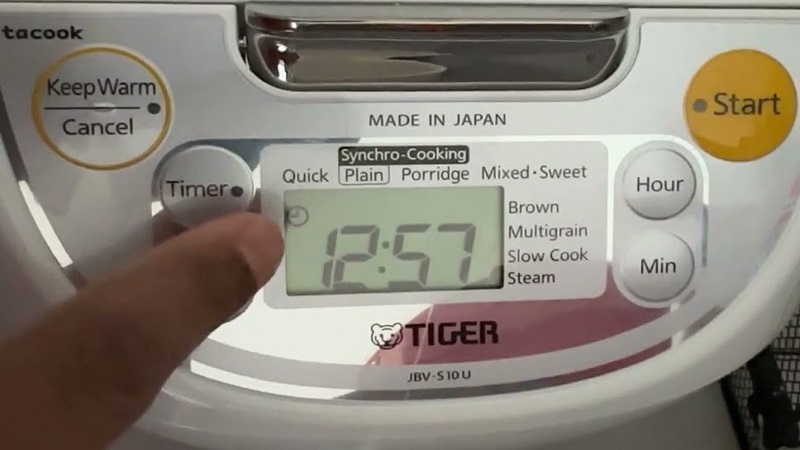
If your Tiger rice cooker timer is not working, don’t panic. Most issues stem from simple power connection errors, dirty sensor buttons, or internal clock reset glitches. This guide will help you restore your appliance’s functionality quickly and safely.
There is nothing quite like the convenience of a perfectly timed rice cooker. You walk into your kitchen, and the aroma of fresh, fluffy grains is already waiting for you. However, when you find your Tiger rice cooker timer not working, that seamless routine comes to a sudden halt. Whether you are dealing with a blank screen, a timer that refuses to start, or a clock that just won’t keep the right time, it can be incredibly frustrating.
As we move through 2026, many of us rely on these smart appliances to save time during our busy work weeks. A Tiger rice cooker is built to last, but like any electronic device, it can encounter minor software or hardware hiccups.
The good news is that most of the time, the fix is much simpler than buying a brand-new machine. Let’s walk through the common reasons why your Tiger rice cooker timer not working, and how you can get it back to its reliable self.
Key Takeaways
- Check the Power Supply: Always ensure the plug is firmly seated and the outlet is active before assuming a timer failure.
- Reset the Internal Clock: Often, the timer fails because the clock is not synced to the current time, preventing the delay function from triggering.
- Clean the Control Panel: Built-up grease or moisture can cause the timer buttons to become unresponsive or “stuck.”
- Check for Error Codes: Modern Tiger models display specific codes on the LCD screen that pinpoint exactly what is malfunctioning.
- Replace the Internal Battery: If your cooker loses its time every time it is unplugged, the small internal backup battery likely needs a replacement.
- Professional Repair: If the unit is under warranty or the internal board is damaged, avoid DIY electrical repairs to keep your machine safe.
Understanding Why Your Tiger Rice Cooker Timer Not Working
The timer function on your Tiger rice cooker is more than just a simple alarm; it is a sophisticated coordination between the internal clock, the sensor board, and the heating element. When this connection is interrupted, the timer feature is often the first to fail. If you notice your Tiger rice cooker timer not working, the first step is to identify the type of issue you are facing. Is the screen dead? Is the timer set but failing to activate? Or is the clock drifting?
Power Supply Issues
Many users report that their Tiger rice cooker timer not working, only to realize the unit was not receiving a steady stream of power. While the display might flicker, a loose connection can cause the internal computer to reset. Always verify that your power cord is pushed all the way into the unit. If you are using a power strip or an extension cord, try plugging the rice cooker directly into a wall outlet to rule out voltage drops.
The Importance of a Synced Clock
On most Tiger models, the “Timer” or “Delay Start” function relies entirely on the internal clock. If the clock is not set to the current time, the cooker will not know when to begin the process. If you have had a recent power outage in your home, the clock has likely reset to 12:00 AM. In this case, the tiger rice cooker timer not working because it is waiting for a time that has already passed or is too far in the future.
Troubleshooting the Control Panel and Display
The control panel is the “brain” of your rice cooker. Since it lives in the kitchen, it is frequently exposed to steam, oil splatters, and food particles. Over time, these can seep into the edges of the buttons, preventing them from registering your touch. When you press the button, the machine doesn’t “feel” the command, leading to the perception of a broken timer.
Visual guide about Tiger Rice Cooker Timer Not Working
Image source: kitchenflock.com
Cleaning the Touch Interface
To fix this, take a soft, slightly damp microfiber cloth. Gently wipe around the edges of the buttons. Avoid using harsh chemicals or soaking the panel in water. If you suspect grease has entered the console, a small amount of rubbing alcohol on a cotton swab can help break down the residue. After cleaning, let the panel dry completely before trying to set the timer again.
Decoding Error Messages
Modern Tiger appliances are quite smart. If the Tiger rice cooker timer not working, look closely at the digital display. Is there a small code like “E1,” “E2,” or “H01” flashing? These are diagnostic codes.
“E” codes usually refer to sensor issues, while “H” codes often relate to heating malfunctions. Check your user manual for the specific code—sometimes, the timer is disabled by the software because the unit detects a potential safety issue, like a sensor short.
Managing the Internal Backup Battery
Did you know your rice cooker has a small internal battery? This battery is responsible for keeping the clock settings and timer preferences saved when you unplug the unit or when there is a short power flicker. If you find your Tiger rice cooker timer not working every time you move the cooker or unplug it to clean, the internal coin-style battery has likely died.
Signs of a Depleted Battery
The biggest indicator is the clock resetting to 12:00 every time the main power cord is disconnected. If your clock is constantly blinking or failing to hold the time you set, the timer function will inevitably fail because the cooker cannot accurately track the delay start interval. Replacing this battery often requires opening the casing, which should be done with caution. If you are not comfortable with basic electronics, consider taking it to a local repair shop.
Operational Tips to Prevent Timer Failures
Prevention is always better than a cure. By treating your rice cooker with a bit of extra care, you can avoid the headache of a malfunctioning timer. Most of these issues are preventable through consistent maintenance and proper usage patterns.
Keep the Unit Dry
Steam is the enemy of electronics. Never place your rice cooker directly under low-hanging cabinets where steam can gather and condense on the control panel. This excess moisture can cause short circuits in the timer logic board. Always use your cooker in a well-ventilated area.
Use the Timer Function Correctly
Some models have specific sequences for setting the timer. For example, you must press “Timer” first, then adjust the hour, then the minute, and finally hit “Start.” If you miss a step, the program might not engage. Also, ensure that the rice bowl is clean and seated correctly. If the weight sensor detects an issue, the timer might refuse to engage for safety reasons.
When to Call a Professional?
Sometimes, the problem is hardware-related. If you have tried resetting the clock, cleaning the panel, and checking the power, but your Tiger rice cooker timer not working persists, there may be a fault in the main printed circuit board (PCB). Dealing with high-voltage capacitors inside the unit can be dangerous if you do not have the proper training.
Evaluating Warranty Status
Before you attempt any invasive repairs, check your purchase date. Tiger rice cookers often come with a limited warranty. If your unit is still covered, contact the manufacturer’s support line. They can walk you through advanced resets or provide information on authorized service centers. Trying to fix the internal circuitry yourself will void any existing warranty, so be sure of your options first.
Conclusion
Finding your Tiger rice cooker timer not working is a temporary setback, not the end of the road for your kitchen companion. By systematically checking your power connection, refreshing your clock settings, cleaning the interface, and inspecting for error codes, you can usually solve the problem in a few minutes.
Remember, these machines are built to be durable; a little bit of troubleshooting usually reveals that the “break” was just a software glitch or a dirty sensor.
Keep your rice cooker clean, protect it from excessive steam, and always ensure your clock is synced. If you follow these simple steps, you will be back to enjoying perfectly timed, delicious meals in no time. If all else fails, a professional repair is a small price to pay to keep such a valuable tool running for years to come. Happy cooking!
Frequently Asked Questions
Why is my Tiger rice cooker clock blinking?
A blinking clock usually indicates that the power was interrupted or the unit was unplugged for an extended period. You need to reset the current time before the timer function will work properly.
Can I use the timer for all types of rice?
Yes, most Tiger rice cookers allow you to use the timer for various settings, such as white rice or brown rice. However, check your manual to ensure the specific cooking mode you selected supports the delay timer feature.
What if my display is completely blank?
If the display is blank, first check your power outlet with another appliance. If the outlet works, the rice cooker’s power cord might be damaged, or there may be an internal power supply failure requiring professional repair.
How do I clean the control panel buttons safely?
Use a dry or slightly damp microfiber cloth to gently wipe the panel. Avoid spraying water or cleaning solutions directly onto the buttons, as liquid can leak into the electronics and cause permanent damage.
Does the timer work if the rice bowl is empty?
Most models have safety sensors that detect the presence of the inner pot. If the pot is not inserted correctly, the unit may disable certain functions, including the timer, to prevent accidental heating.
Is it worth repairing a Tiger rice cooker?
If your cooker is a high-end model or still under warranty, it is definitely worth repairing. For older, base-model units, weigh the repair cost against the price of a new machine before deciding.